
Welcome to 21st Century dispensing!
Dispensing practice in most clinics has changed little over hundreds of years, but the world and expectations have moved on. The Dispensing Platform (DP) will transform your dispensary with commercial software that cuts admin tasks, prevents errors and ensures profitability.
Crucially, all your daily needs (including inventory management) are accessed on the practitioner dashboard, making it super easy and convenient. The Personal option is for practitioners who simply wish to use DP to manage their dispensary; Business users have a website, with all the opportunities and flexibility that brings. There are two templates: DP Clinic site – Dispensing Platform for CHM practitioners, and DP Clinic site – Dispensing Platform for Western herbalists.
Prescribing
- Script-writing is quick with the responsive ‘Formula Builder’, which makes duplicates, misspellings, or adding unavailable herbs impossible.
- The site gives access to 80+ formulas in the TEAM database and reference information on doses, names, substitutions and how processing alters a herb’s actions.
- There are three routes to formula creation: (a) ‘Formula Builder’, (b) reusing a patient’s earlier order, or (c) using a script from the ‘Favourite Formula’ folder.
- Scripts can be named, saved and reused from the patient’s or ‘favourites’ folders, and can be moved to practice management Apps.
- Existing scripts can be altered, renamed and saved to build variations of key formulas.
Financials
- The costs of herbs and the total script show as formulas are created, and in the Cart. Different shipping and packaging options reflect the flexible approaches taken by clinics.
- Fees can be added as a percentage or at a flat rate. Set them when adding a patient’s details, but you can alter this when a script is in the Cart, meeting everyone’s needs at all times.
- Patients don’t get a full breakdown of costs in their payment links; they just get the order details (including herb names), the total cost, and an option to change the shipping address.
- Payment links are via a third-party, regulated payment processor (Stripe), which increases client confidence and avoids exposure to fraud.
- There’s a ‘pay later’ option for clients who will pay in person.
Practice management
- Your dashboard has a choice of languages for herbs and labels, an ‘add logo’ option for your labels, and instruction templates for taking herbs.
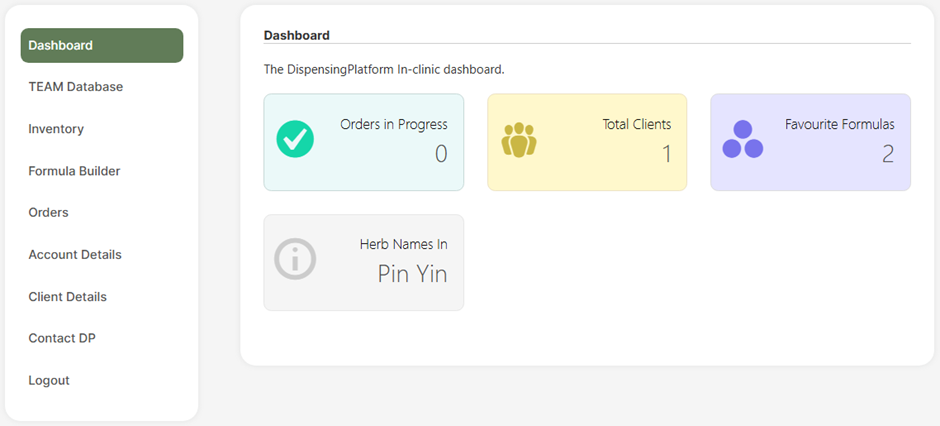
- Client details, order history, a ‘favourite formulas’ folder, a contact DP tab and Inventory management are all on the dashboard.
- Label templates include all the details needed for regulatory compliance, along with your personalised instructions. A ‘Print label’ button is conveniently located in each order.
- Download patients’ scripts individually or in a single PDF for easy access to script structures and changes.
Data control
- Client and practitioner details are easy to add, and email addresses are the defining data point (it can’t be shared), as Business sites use them for payment requests.
- All data is securely on a GDPR-compliant server and backed up daily.
Inventory
- Access the herbal inventory via the dashboard. Inventory updates are quick and accurate with our CSV file template, or herbs can be added or edited individually.
- Stock levels automatically adjust after each order is completed.
- Low-stock warnings can be set for each herb, which makes inventory management a quick visual search of the coloured bars.
- The batch numbers of herbs are recorded for all orders in accordance with full regulatory compliance. If there is a product recall, a ‘Search’ will swiftly identify which patients had that batch.
- Switching batches while prescribing is simple; just respond to prompts to switch to the new batch.
Your patients (Business)
- Your patients benefit from secure, recognisable payment links, with all order details clearly set out for them.
- Creating their own account (with a dashboard) lets them view their orders (and instructions) or change shipping details.
These points in greater depth:
Stock Control
The Dispensing Platform makes this crucial issue of herbal inventory management easy via the ‘Inventory’ tab in the Dashboard. Each herb (or product) can be recorded by:
- The date of purchase
- The expiry date
- The quantity
Barcode scanning can simplify the process and increase stock control accuracy and speed.
Stock levels automatically adjust after each prescription to ensure clear, accurate and current levels. Low levels are flagged up to alert you and suggest reordering.
The system provides comprehensive management of an herbal inventory, allowing traceability and batch monitoring with full regulatory compliance and product control.
TEAM Classic Formulas
Classical East Asian herbal medicine is based on adapting known formulas to match a patient’s dynamics. The TEAM database has over 80 classic formulas, with details on their Actions, Indications, Structure, Adaptations, a Discussion and the Cautions and Contraindications. This invaluable database provides access to the key formulas experienced herbalists typically refer to and is a natural refresher to the reasoning behind original formulas.
Formula Builder
The ‘Formula Builder’ is a simple way to create, save and prescribe formulas. As a herb name is typed, the drop-down menu narrows the options to a small choice. Adding herbs and adjusting doses creates the formula.
Dosages are shown as raw/day, granules/day or total granules:
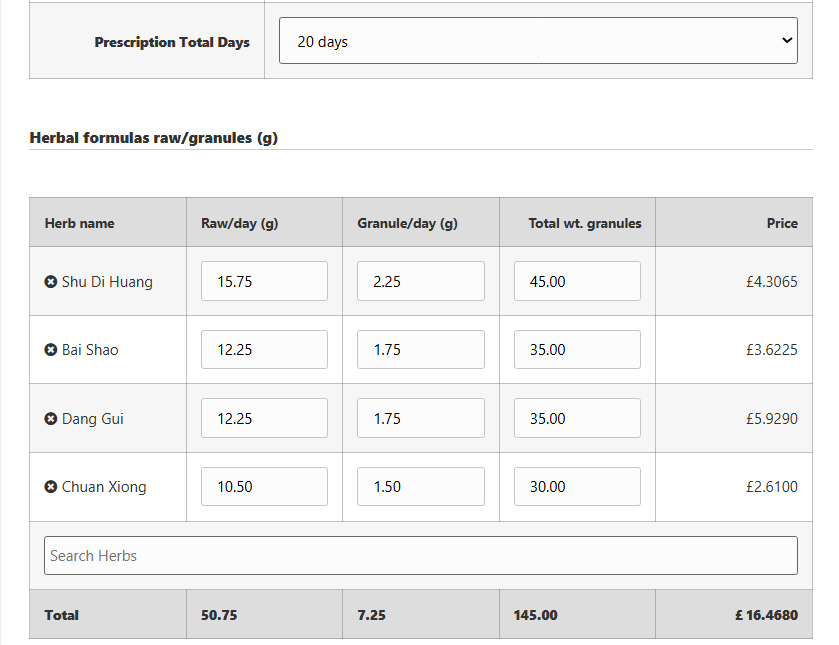
Once the formula has been created, it can be named and saved (or added to the Favourite Formulas folder). It’s then a simple task to edit and adapt it for patients in the future.
Herbal Information
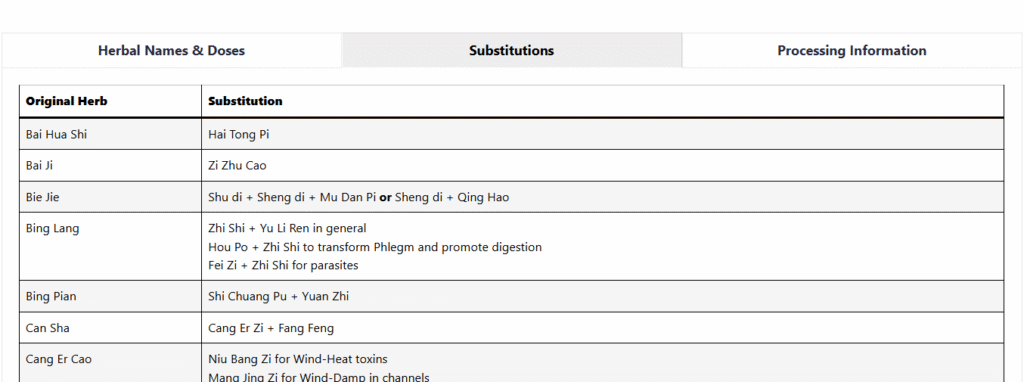
In addition to the TEAM database of over 80 classic scripts and their adaptations, the site has a guide to recommended dosages, herb names, and the clinical effects of Pao Zhi processing.
Recommended substitutions for over 90 herbs are available to support precision.
Practitioner Dashboard
Your practitioner Dashboard offers a choice of herb names in Pinyin, Latin, or Chinese (and language on the labels). You can add branding to labels or alter client instruction templates. It provides access to formulas, orders and products 24/7.
Client details are easy to add or edit, check past scripts and add to the ‘Favourite Formulas’ folder, plus there are ‘Help’ videos.
Client Database
Easily store and manage client details, from names and contact info to editable commission values, in one secure, searchable place. For faster, more accurate prescribing, we recommend adding client details before writing their formula.
Favourite Formulas
This is a dedicated folder for favourite prescriptions and their adaptations that you want to keep to hand. These can be quickly assigned to a client, added to the Cart and adjusted before prescribing.
Payment Options
Personal site owners must manage payments in person, while Business site owners can connect payments to clients remotely via recognised payment processors. Familiar banking platforms increase confidence and dramatically reduce the time practitioners spend checking for and chasing payments.
When taking payment in the clinic, choose ‘Collect payment later’. Then ‘Add to Clients Orders’ and finally ‘Place Order’. The order details and ‘print label’ button appear.
With remote payments, choose the ‘client pays’ option and a secure payment link is emailed to them requesting funds. When they pay, you’ll see it in the dashboard, and you can process their order with confidence.
Labels
Quickly print professional, branded labels at the press of a button, in your preferred language, with the dosage, ingredients, instructions and contact details. They meet legislation and patient needs, clearly and consistently, saving you time and energy every time.
Pricing
Please see the Pricing page – we’re determined to support herbal practice, and our pricing structure reflects this.
Shop
Business sites can add the Shop to increase the range of products available to your clients. These can be virtual (information packs) or physical products. Our bespoke commerce software can accommodate VAT-free and taxable products in single transactions.
Patient Accounts
Business sites have Patient accounts where patients can view their full order history, update shipping details, track current orders, and reorder products when they’re available, without the need to contact you. They boost transparency, build trust, and give your patients more control over their care.
Security
Website data security is a critical feature of the Dispensary Platform, and we’ve made every effort to minimise risk and maximise safety features. Our fully GDPR-compliant software is hosted on a super-secure server with SOC2 Type II and SOC3 reports and an ISO 27001:2022 certification.
Admin access on Enterprise sites requires the latest biometric, two-step authentication, while clients’ password access is restricted to dedicated data sections.
All payments are made off-site via links to regulated payment processors, avoiding the possibility of card details being compromised via DP.
Software Development
The Dispensing Platform software is bespoke and developed to maximise security, minimise errors and reduce exposure to future threats. Nearly all of the software has been coded specifically for the site, with an absolute minimum reliance on third-party plug-ins (which need updates and are vulnerable to threats).
The platform is designed by an herbalist, working in tandem with a dispensary, and coded by an engineer with years of experience in the security industry.
Registration
Client accounts on Enterprise sites are automatically registered and are instantly accessible (once they confirm their email address).
Exiting
Should you wish to stop using the Dispensing Platform and require copies of your data, it can be supplied in CSV file format.